RPGツクールXP/VX用のRGSS素材です。
一部英語版対応です。
(A few materials can be used for English RPG MAKER XP/VX.)
競合率はルファーの独断と偏見なのでたまにハズレます。
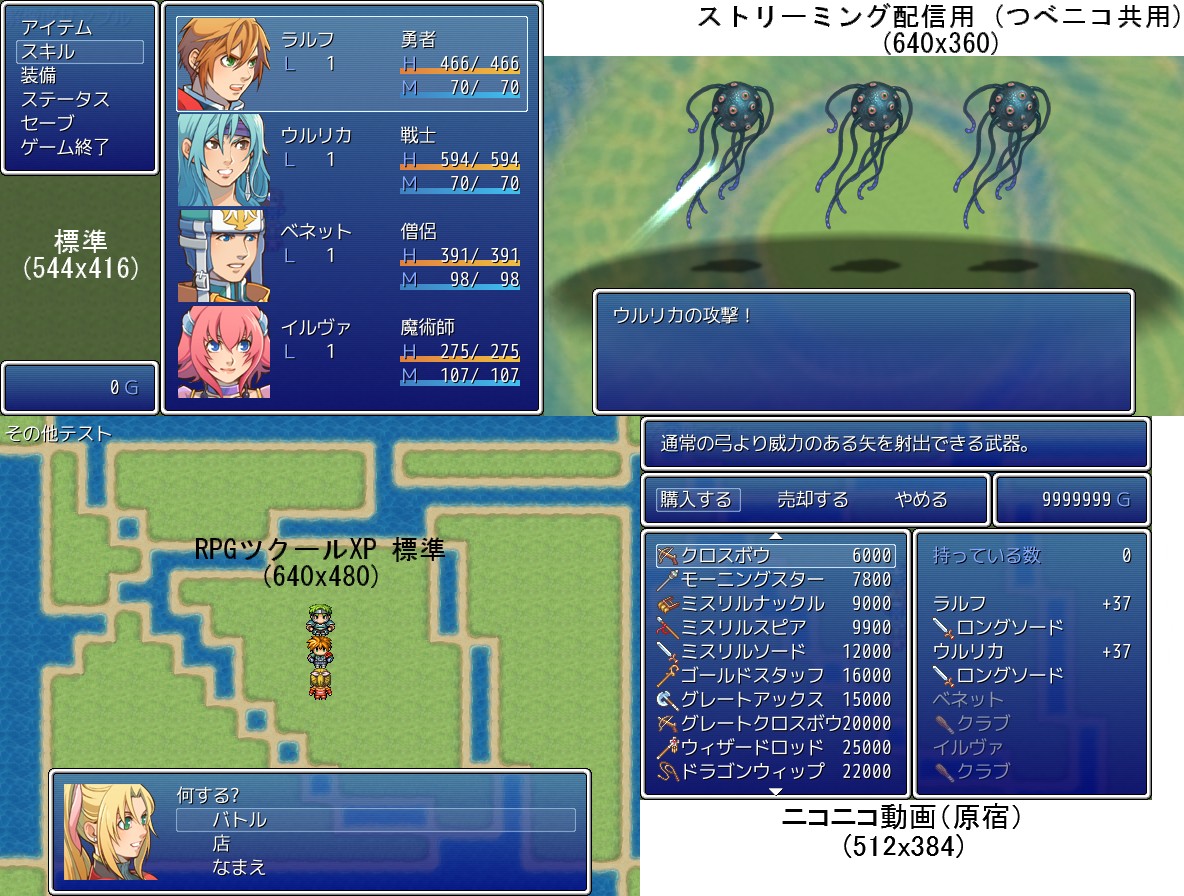
↑スクリーンショット (クリックで拡大)
#==============================================================================
# ■ 画面解像度変更対応
#------------------------------------------------------------------------------
# Graphics.resize_screen で画面サイズを変更した際、画面表示が崩れないように
# します。さまざまな解像度に対応します。
# (C) ルファー
# WebSite https://tkoolerlufar.pages.dev/
#==============================================================================
=begin
=対応RGSS
2
=必要なライブラリ
矩形加減算ライブラリ
=他の素材との競合の可能性
!!. 結構起こりえると思います。掲示板などで連絡してくだされば対応します。
=カスタマイズ項目について
カスタマイズ項目は、スクリプトエディタの編集画面を右クリック→「検索」で、
「カスタマイズ項目」と検索すればすぐに見つかります。
各項目の前に説明を載せたので、それを参照しながら設定してください。
=注意
* 画面のサイズについて
大小さまざまな解像度にあわせてレイアウトを変えますが、
画面の高さは145pxが下限です。
* マップのサイズについて
小さすぎるマップを作ると表示がおかしくなってしまいます。
幅、高さ共に、カスタマイズ項目「画面解像度」の説明にある
「画面あたりのマップサイズ」より小さくしないようにしてください。
=大きなレイアウト変更例
* タイトル画面
タイトル画像が自動的に伸縮(縦横比保持)され、左上隅を画面に合わせる位置に
表示されます。
画面と同じ大きさのタイトル画像は、原寸大で表示されます。
タイトル画像の位置は、カスタマイズ項目
「タイトルグラフィックを中央に表示するフラグ」で変更できます。
* メニュー画面
HP/MP ゲージの長さを幅に合わせて調整します。
高さが低くなると表示する情報が少なくなります。
- 240px 未満…名前、ステート、 HP
- 240~335px…顔、名前、ステート、 HP/MP
- 336~423px…顔、名前、レベル、ステート、クラス、 HP/MP (デフォルト)
- 424px 以上…顔の全体図、名前、レベル、ステート、クラス、 HP/MP
* スキル画面
高さが 145px 以上でないとエラーが発生します。
* ステータス画面
幅 512px 、高さ 336px までは必要に応じてレイアウトを微調整します。
これより小さいサイズでは、方向キーでステータスをスクロールできます。
* セーブ・ロード画面
特に大きな変化はありませんが、高さが 312px を下回ると
RTP の歩行グラフィックの頭が切れてしまいます。
また、高さが 4px の倍数でなければ画面下部に小さな余白ができます。
* ショップ画面
高さが 384px を下回る場合、装備品の購入時に
能力変化のみが表示されます。持っている装備品の名前は表示されません。
* デバッグ画面
ウィンドウの枠が画面外にはみ出るようになっています。これは仕様です。
どうせプレイヤーは見ないから問題ないよね!
* ゲームオーバー画面
ゲームオーバー画像が自動的に伸縮(縦横比保持)され、中心を画面に合わせる
位置に表示されます。
ゲームオーバー画像が画面と同じ大きさの場合、原寸大で表示されます。
=更新履歴
2013/02/08 タイトルグラフィックを中央に表示するフラグの追加
説明文の訂正
再定義しているメソッドの誤記訂正
2012/05/04 公開
=再定義している定数
Game_Player::CENTER_X
Game_Player::CENTER_Y
=再定義しているメソッド
(多すぎて網羅していない可能性があります。ご了承ください。)
Game_Map#setup_scroll
Game_Map#calc_parallax_x
Game_Map#calc_parallax_y (エイリアスなし)
Game_Map#scroll_down (エイリアスなし)
Game_Map#scroll_right (エイリアスなし)
Game_Enemy#screen_x
Game_Enemy#screen_y
Game_Player#center (エイリアスなし)
Game_Player#update_scroll (エイリアスなし)
Sprite_Base#start_animation
Sprite_Timer#initialize
Sprite_Picture#update
Spriteset_Map#create_viewports
Spriteset_Battle#create_viewports
Spriteset_Battle#create_battleback
Spriteset_Battle#create_battlefloor
Window_Help#initialize
Window_MenuStatus#initialize
Window_MenuStatus#refresh (エイリアスなし)
Window_MenuStatus#update_cursor (エイリアスなし)
Window_SkillStatus#initialize
Window_SkillStatus#refresh
Window_Equip#initialize
Window_Status#initialize
Window_Status#dispose (エイリアスなし)
Window_Status#create_contents (エイリアスなし)
Window_Status#refresh
Window_SaveFile#initialize
Window_SaveFile#refresh
Window_ShopBuy#initialize
Window_ShopNumber#initialize
Window_ShopNumber#refresh (エイリアスなし)
Window_ShopStatus#initialize
Window_NameEdit#initialize
Window_NameInput#initialize
Window_Message#initialize
Window_Message#create_back_sprite
Window_Message#reset_window
Window_BattleStatus#initialize
Window_BattleStatus#draw_item
Window_TargetEnemy#initialize
Window_DebugLeft#initialize
Window_DebugRight#initialize
Scene_Title#create_title_graphic
Scene_Title#create_command_window
Scene_Menu#start
Scene_Item#start
Scene_Item#show_target_window
Scene_Item#hide_target_window
Scene_Skill#start
Scene_Skill#show_target_window
Scene_Skill#hide_target_window
Scene_Equip#create_item_windows
Scene_End#create_command_window
Scene_Shop#start
Scene_Shop#create_command_window
Scene_Debug#start
Scene_Battle#create_info_viewport
Scene_Battle#start_skill_selection
Scene_Battle#start_item_selection
Scene_Gameover#create_gameover_graphic
=新規定義しているクラス
Game_Player::Lufar_AnyResolution_CenterX
Game_Player::Lufar_AnyResolution_CenterY
=新規定義しているクラス変数
Window_Status@@Lufar_AnyResolution_DefaultOX
Window_Status@@Lufar_AnyResolution_DefaultOY
=新規定義しているメソッド
Game_Map._Lufar_AnyResolution_TileWidth
Game_Map._Lufar_AnyResolution_TileHeight
Game_Map._Lufar_AnyResolution_ShownWidth
Game_Map._Lufar_AnyResolution_ShownHeight
Window_Status#update
=end
module Lufar
module AnyResolution
#------------------------------------------------------------------------
# ○ 定数
#------------------------------------------------------------------------
RPGVX = [01040, 0640] # RPGVX 標準の解像度
RPGXP = [01200, 0740] # RPGXP 標準の解像度 (最大)
NICOVIDEO = [01000, 0600] # ニコニコ動画旧規格の解像度
STREAMING = [01200, 0550] # ストリーミング配信用の解像度
#------------------------------------------------------------------------
# ◎ カスタマイズ項目
#------------------------------------------------------------------------
# 画面解像度
## RPGVX …画面あたりのマップサイズ: 17 x 13 = 221
## RPGツクールVX 標準の解像度 (544x416) です。
## RPGXP …画面あたりのマップサイズ: 20 x 15 = 300
## RPGツクールXP 標準の解像度 (640x480) です。
## RPGVX の限界であり、 RPG200x の 4 倍の面積があります。
## NICOVIDEO …画面あたりのマップサイズ: 16 x 12 = 192
## ニコニコ動画 (原宿4:3) の解像度 (512x384) です。
## 普通よりやや小さいですが、その分処理が軽いです。
## 実況してもらうのを前提したいときにも。
## STREAMING …画面あたりのマップサイズ: 20 x 11.25 = 225
## YouTube (360p), ニコニコ動画 (Zero中画面) 用の解像度
## (640x360) です。
## 一般的なワイド映像と同じ縦横比です。
## こちらも実況向けですが、でかいのでちょっと重いです。
## [幅, 高さ]…画面あたりのマップサイズ: (幅÷32) x (高さ÷32)
## 画面の大きさを任意の値にします。
## たとえば [640, 384] と入れると解像度が 640x384px になります。
## 必ず半角で入力してください。
## nil …スクリプトで画面解像度を制御する場合は
## 必ずこの値を設定してください。
## その代わり、素材の競合が発生しやすくなります。
## 上級者向け。
FIX = STREAMING
# タイトルグラフィックを中央に表示するフラグ
## true …タイトルグラフィックは中心を画面に合わせる位置に表示されます。
## false…タイトルグラフィックは左上隅を画面に合わせる位置に表示されます。
TITLE_CENTERING = false
# 「暗い」文章背景の幅を画面に合わせるフラグ
## true …幅はゲーム画面に合わせます。
## false…幅はあくまでもエディタでのプレビューと同じにします。
MESSAGEBACK_RESIZE = true
# 文章ウィンドウの幅を画面に合わせるフラグ
## true …幅はゲーム画面に合わせます。
## 画面の幅を広げれば1行に長い文章を表示できます。
## false…幅はあくまでもエディタでのプレビューと同じにします。
MESSAGE_RESIZE = false
# 「暗い」文章背景の幅を画面に合わせるフラグ
## true …幅はゲーム画面に合わせます。
## false…幅はあくまでもエディタでのプレビューと同じにします。
MESSAGEBACK_RESIZE = true
# ピクチャの表示位置を補正する方法
## 0…補正をしません。
## エディタで表示位置を (0, 0) に設定すると
## 必ず画面の左上端に表示されます。
## 画面サイズを固定するとき向けです。
## 1…原点を補正します。
## エディタで表示位置を (272, 208) に設定すると
## 必ず画面の中央に表示されます。
## タイトルロゴのみをピクチャとして表示するとき向けです。
## 2…単位を補正します。
## エディタで表示位置を (0, 0) に設定すると
## 必ず画面の左上端に表示され、
## エディタで表示位置を (272, 208) に設定すると
## 必ず画面の中央に表示されます。
## ピクチャを多用するとき向けです。
PICTURE_REVISE_POSITION = 0
# ピクチャの拡大率を補正する方法
## 0…補正をしません。
## 自動拡大により画質が低くなったりするのを避けたいとき向けです。
##
## 1…画面サイズに合わせて拡大縮小します。
##
## 2…画面サイズに合わせて拡大縮小しますが、縦や横にゆがまないようにします。
PICTURE_REVISE_ZOOM = 0
# 敵の陣形、バトルフロアの幅の補正
## 0…補正をしません。
## 敵の陣形は画面中央に寄せられます。
## バトルフロアは原寸大で表示されます。
## 1…補正をします。
## 敵の陣形は画面のサイズに応じて散ったり集まったりします。
## バトルフロアは画面の幅に合わせて横に伸縮します。
BATTLE_REVISE = 1
#------------------------------------------------------------------------
# ○ 解像度のセット
#------------------------------------------------------------------------
Graphics.resize_screen(*FIX) if FIX
end
end
class Game_Map
#--------------------------------------------------------------------------
# ○ 画面表示分の横タイル数の取得
#--------------------------------------------------------------------------
def self._Lufar_AnyResolution_TileWidth
return (Graphics.width + (1 << 5) - 1) >> 5
end
#--------------------------------------------------------------------------
# ○ 画面表示分の縦タイル数の取得
#--------------------------------------------------------------------------
def self._Lufar_AnyResolution_TileHeight
return (Graphics.height + (1 << 5) - 1) >> 5
end
#--------------------------------------------------------------------------
# ○ 画面表示分の横幅の取得
#--------------------------------------------------------------------------
def self._Lufar_AnyResolution_ShownWidth
return Graphics.width << 3
end
#--------------------------------------------------------------------------
# ○ 画面表示分の縦幅の取得
#--------------------------------------------------------------------------
def self._Lufar_AnyResolution_ShownHeight
return Graphics.height << 3
end
#--------------------------------------------------------------------------
# ● スクロールのセットアップ
#--------------------------------------------------------------------------
alias _Lufar_AnyResolution_SetupScroll setup_scroll
def setup_scroll(*args)
_Lufar_AnyResolution_SetupScroll(*args)
## 画面非表示分の横幅 / 2
@margin_x = (width * 0x100 -
self.class._Lufar_AnyResolution_ShownWidth ) / 2
## 画面非表示分の縦幅 / 2
@margin_y = (height * 0x100 -
self.class._Lufar_AnyResolution_ShownHeight) / 2
end
#--------------------------------------------------------------------------
# ● 遠景表示 X 座標の計算
# bitmap : 遠景ビットマップ
#--------------------------------------------------------------------------
alias _Lufar_AnyResolution_CalcParallaxX calc_parallax_x
def calc_parallax_x(*args)
bitmap = args[0]
if bitmap != nil and !@parallax_loop_x and !loop_horizontal?
## 画面解像度に応じた分岐
w1 = bitmap.width - Graphics.width
w2 = @map.width * 32 - Graphics.width
if w1 > 0 and w2 > 0
return @parallax_x * w1 / w2 / 8
end
end
_Lufar_AnyResolution_CalcParallaxX(*args)
end
#--------------------------------------------------------------------------
# ● 遠景表示 Y 座標の計算
# bitmap : 遠景ビットマップ
#--------------------------------------------------------------------------
def calc_parallax_y(bitmap)
if bitmap == nil
return 0
elsif @parallax_loop_y
return @parallax_y / 16
elsif loop_vertical?
return 0
else
## 画面解像度に応じた分岐
h1 = bitmap.height - Graphics.height
h2 = @map.height * 32 - Graphics.height
if h1 <= 0 or h2 <= 0
return 0
else
return @parallax_y * h1 / h2 / 8
end
end
end
#--------------------------------------------------------------------------
# ● 下にスクロール
# distance : スクロールする距離
#--------------------------------------------------------------------------
def scroll_down(distance)
if loop_vertical?
@display_y += distance
@display_y %= @map.height * 256
@parallax_y += distance
else
last_y = @display_y
## 画面のサイズに応じた座標
@display_y = [@display_y + distance,
height * 0x100 - self.class._Lufar_AnyResolution_ShownHeight].min
@parallax_y += @display_y - last_y
end
end
#--------------------------------------------------------------------------
# ● 右にスクロール
# distance : スクロールする距離
#--------------------------------------------------------------------------
def scroll_right(distance)
if loop_horizontal?
@display_x += distance
@display_x %= @map.width * 256
@parallax_x += distance
else
last_x = @display_x
## 画面のサイズに応じた座標
@display_x = [@display_x + distance,
width * 0x100 - self.class._Lufar_AnyResolution_ShownWidth ].min
@parallax_x += @display_x - last_x
end
end
end
class Game_Player < Game_Character
#--------------------------------------------------------------------------
# ● 定数(?)
#--------------------------------------------------------------------------
remove_const(:CENTER_X) rescue nil
remove_const(:CENTER_Y) rescue nil
class Lufar_AnyResolution_CenterX
def to_int
(Graphics.width / 2 - 16) * 8 # 画面中央の X 座標 * 8
end
end
class Lufar_AnyResolution_CenterY
def to_int
(Graphics.height / 2 - 16) * 8 # 画面中央の Y 座標 * 8
end
end
=begin
CENTER_X, CENTER_Y の定義をここで変えています。
画面解像度の設定が nil のときでこの定数に関して競合が発生する場合は
競合する素材で Integer(CENTER_X) などと訂正すると直ると思います。
=end
if Lufar::AnyResolution::FIX
CENTER_X = Lufar_AnyResolution_CenterX.new.to_int
CENTER_Y = Lufar_AnyResolution_CenterY.new.to_int
else
CENTER_X = Lufar_AnyResolution_CenterX.new
CENTER_Y = Lufar_AnyResolution_CenterY.new
end
#--------------------------------------------------------------------------
# ● 画面中央に来るようにマップの表示位置を設定
# x : X 座標
# y : Y 座標
#--------------------------------------------------------------------------
def center(x, y)
display_x = x * 256 - Integer(CENTER_X) ## 座標を計算
unless $game_map.loop_horizontal? # 横にループしない?
max_x = $game_map.width * 0x100 -
Game_Map._Lufar_AnyResolution_ShownWidth ## 最大値を計算
display_x = [0, [display_x, max_x].min].max # 座標を修正
end
display_y = y * 256 - Integer(CENTER_Y) ## 座標を計算
unless $game_map.loop_vertical? # 縦にループしない?
max_y = $game_map.height * 0x100 -
Game_Map._Lufar_AnyResolution_ShownHeight ## 最大値を計算
display_y = [0, [display_y, max_y].min].max # 座標を修正
end
$game_map.set_display_pos(display_x, display_y) # 表示位置変更
end
#--------------------------------------------------------------------------
# ● スクロール処理
#--------------------------------------------------------------------------
def update_scroll(last_real_x, last_real_y)
ax1 = $game_map.adjust_x(last_real_x)
ay1 = $game_map.adjust_y(last_real_y)
ax2 = $game_map.adjust_x(@real_x)
ay2 = $game_map.adjust_y(@real_y)
## 定数周りのエラー回避
if ay2 > ay1 and ay2 > Integer(CENTER_Y)
$game_map.scroll_down(ay2 - ay1)
end
if ax2 < ax1 and ax2 < Integer(CENTER_X)
$game_map.scroll_left(ax1 - ax2)
end
if ax2 > ax1 and ax2 > Integer(CENTER_X)
$game_map.scroll_right(ax2 - ax1)
end
if ay2 < ay1 and ay2 < Integer(CENTER_Y)
$game_map.scroll_up(ay1 - ay2)
end
end
end
class Sprite_Base < Sprite
#--------------------------------------------------------------------------
# ● アニメーションの開始
#--------------------------------------------------------------------------
alias _Lufar_AnyResolution_StartAnimation start_animation
def start_animation(*args)
begin
_Lufar_AnyResolution_StartAnimation(*args)
rescue
$@ = caller
raise
end
if @animation.position == 3
if viewport == nil
## ビューポートが無ければ画面アニメーションを画面の中央に置く
@animation_ox = Graphics.width / 2
@animation_oy = Graphics.height / 2
end
end
end
end
class Sprite_Timer < Sprite
#--------------------------------------------------------------------------
# ● オブジェクト初期化
# viewport : ビューポート
#--------------------------------------------------------------------------
alias _Lufar_AnyResolution_Init initialize
def initialize(*args)
_Lufar_AnyResolution_Init(*args)
## 画面右端に置く
self.x = Graphics.width - self.bitmap.width
end
end
class Game_Enemy < Game_Battler
#--------------------------------------------------------------------------
# ● バトル画面 X 座標の取得
#--------------------------------------------------------------------------
alias _Lufar_AnyResolution_ScreenX screen_x
def screen_x
x = _Lufar_AnyResolution_ScreenX
## 画面の大きさが特殊なら
case Lufar::AnyResolution::BATTLE_REVISE
when 0
## 真ん中に寄せる
x = x + (Graphics.width - 544) / 2
when 1
## 陣形を調整
x = x * Graphics.width / 544
end
x
end
#--------------------------------------------------------------------------
# ● バトル画面 Y 座標の取得
#--------------------------------------------------------------------------
alias _Lufar_AnyResolution_ScreenY screen_y
def screen_y
y = _Lufar_AnyResolution_ScreenY
## 画面の大きさが特殊なら
case Lufar::AnyResolution::BATTLE_REVISE
when 0
## 真ん中に寄せる
y = y + (Graphics.height - 416) / 2
when 1
## 陣形を調整
y = y * (Graphics.height - 128) / 288## 288==(416 - 128)
end
y
end
end
class Sprite_Picture < Sprite
#--------------------------------------------------------------------------
# ● フレーム更新
#--------------------------------------------------------------------------
alias _Lufar_AnyResolution_Update update
def update(*args)
_Lufar_AnyResolution_Update(*args)
unless @picture_name == ""
## 設定項目により分岐
case Lufar::AnyResolution::PICTURE_REVISE_POSITION
when 1
## 座標を補正
self.x += (Graphics.width - 544) / 2
self.y += (Graphics.height - 416) / 2
when 2
## 単位を補正
self.x = self.x * Graphics.width / 544
self.y = self.y * Graphics.height / 416
end
case Lufar::AnyResolution::PICTURE_REVISE_ZOOM
when 1
## 画面にあわせて伸縮
self.zoom_x *= (Graphics.width + 0.5) / 544.0
self.zoom_y *= (Graphics.height + 0.5) / 416.0
when 2
## 画面にあわせて伸縮(縦横比を保持)
if Graphics.width * 416 < Graphics.height * 544 # 縦に拡大した場合
self.zoom_x *= (Graphics.height + 0.5) / 416.0
self.zoom_y *= (Graphics.height + 0.5) / 416.0
else # 横に拡大した場合
self.zoom_x *= (Graphics.width + 0.5) / 544.0
self.zoom_y *= (Graphics.width + 0.5) / 544.0
end
end
end
end
end
class Spriteset_Map
#--------------------------------------------------------------------------
# ● ビューポートの作成
#--------------------------------------------------------------------------
alias _Lufar_AnyResolution_CreateViewports create_viewports
def create_viewports(*args)
_Lufar_AnyResolution_CreateViewports(*args)
## 画面と同じサイズにする
@viewport1.rect.set(0, 0, Graphics.width, Graphics.height)
@viewport2.rect.set(0, 0, Graphics.width, Graphics.height)
@viewport3.rect.set(0, 0, Graphics.width, Graphics.height)
end
end
class Spriteset_Battle
#--------------------------------------------------------------------------
# ● ビューポートの作成
#--------------------------------------------------------------------------
alias _Lufar_AnyResolution_CreateViewports create_viewports
def create_viewports(*args)
_Lufar_AnyResolution_CreateViewports(*args)
## 画面と同じサイズにする
@viewport1.rect.set(0, 0, Graphics.width, Graphics.height)
@viewport2.rect.set(0, 0, Graphics.width, Graphics.height)
@viewport3.rect.set(0, 0, Graphics.width, Graphics.height)
end
#--------------------------------------------------------------------------
# ● バトルバックスプライトの作成
#--------------------------------------------------------------------------
alias _Lufar_AnyResolution_CreateBattleback create_battleback
def create_battleback(*args)
## 既定の処理
_Lufar_AnyResolution_CreateBattleback(*args)
## ビットマップソース
source = $game_temp.background_bitmap
## ビットマップの大きさ
bitmap_size = Math.hypot(Graphics.width, Graphics.height).ceil
if Graphics.width > Graphics.height
bitmap_width = bitmap_size
bitmap_height = bitmap_size * Graphics.height / Graphics.width
else
bitmap_width = bitmap_size * Graphics.width / Graphics.height
bitmap_height = bitmap_size
end
## ビットマップの再作成、スプライトにセット
@battleback_sprite.bitmap.dispose if @battleback_sprite.bitmap.is_a?(Bitmap)
bitmap = Bitmap.new(bitmap_width, bitmap_height)
bitmap.stretch_blt(bitmap.rect, source, source.rect)
bitmap.radial_blur(90, 12)
@battleback_sprite.bitmap = bitmap
@battleback_sprite.ox = bitmap.width / 2
@battleback_sprite.oy = bitmap.height / 2
@battleback_sprite. x = Graphics.width / 2
@battleback_sprite. y = Graphics.height / 2 + 0x10
end
#--------------------------------------------------------------------------
# ● バトルフロアスプライトの作成
#--------------------------------------------------------------------------
alias _Lufar_AnyResolution_CreateBattlefloor create_battlefloor
def create_battlefloor(*args)
_Lufar_AnyResolution_CreateBattlefloor(*args)
## 画面の大きさが特殊なら
case Lufar::AnyResolution::BATTLE_REVISE
when 0
## 真ん中に寄せる
@battlefloor_sprite.y += (Graphics.height - 416) / 2
when 1
## やや下に寄せる
@battlefloor_sprite.y = @battlefloor_sprite.y *
(Graphics.height - 128) / 288## 288==(416 - 128)
end
## 設定項目により分岐
case Lufar::AnyResolution::BATTLE_REVISE
when 0
## X 座標を中央に寄せる
@battlefloor_sprite.x += (Graphics.width - 544) / 2
when 1
## 画面にあわせて伸縮
@battlefloor_sprite.zoom_x =
(Graphics.width - @battlefloor_sprite.x*2) / 544.0
end
end
end
class Window_Help < Window_Base
#--------------------------------------------------------------------------
# ● オブジェクト初期化
#--------------------------------------------------------------------------
alias _Lufar_AnyResolution_Init initialize
def initialize(*args)
_Lufar_AnyResolution_Init(*args)
## 幅を画面に合わせる
self.width = Graphics.width
create_contents
end
end
class Window_MenuStatus < Window_Selectable
#--------------------------------------------------------------------------
# ● オブジェクト初期化
# width : ウィンドウの幅
#--------------------------------------------------------------------------
alias _Lufar_AnyResolution_Init initialize
def initialize(*args)
_Lufar_AnyResolution_Init(*args)
## サイズを画面にあわせる
self.width = Graphics.width - 160
self.height = Graphics.height
create_contents
#~ p self.width, self.height, self.contents.rect
@Lufar_AnyResolution_Refresh_Ready = true
refresh
end
#--------------------------------------------------------------------------
# ● リフレッシュ
#--------------------------------------------------------------------------
def refresh
return unless @Lufar_AnyResolution_Refresh_Ready
self.contents.clear
## セルの高さ
(@Lufar_AnyResolution_CellHeight = self.contents.height / 4)*4
## セルの Y 座標
@Lufar_AnyResolution_CellOy = self.contents.height % 4 / 2
## セルの大きさに合わせた処理
@item_max = $game_party.members.size
for actor in $game_party.members
face_height = [@Lufar_AnyResolution_CellHeight - 4, 96].min
## セルの行数
rows = [1, [(@Lufar_AnyResolution_CellHeight - 4) / WLH, 3].min].max
## セルが2行以上のときのみ顔を表示する
if rows >= 2
draw_actor_face(actor, 2,
@Lufar_AnyResolution_CellOy +
actor.index * @Lufar_AnyResolution_CellHeight +
(@Lufar_AnyResolution_CellHeight - face_height) / 2,
face_height)
end
## 情報の表示座標を決定
x = rows > 1 ? 104 : 8
y = @Lufar_AnyResolution_CellOy +
actor.index * @Lufar_AnyResolution_CellHeight +
(@Lufar_AnyResolution_CellHeight - WLH*rows) / 2
## HP/MP ゲージは右に8ピクセルの余白を作る
if rows > 2
draw_actor_name (actor, x , y )
draw_actor_level(actor, x , y + WLH * 1)
draw_actor_state(actor, x , y + WLH * 2)
draw_actor_class(actor, x + 120, y )
draw_actor_hp (actor, x + 120, y + WLH * 1, contents.width - 128 - x)
draw_actor_mp (actor, x + 120, y + WLH * 2, contents.width - 128 - x)
elsif rows == 2
draw_actor_name (actor, x , y )
draw_actor_state(actor, x , y + WLH * 1)
draw_actor_hp (actor, x + 120, y , contents.width - 128 - x)
draw_actor_mp (actor, x + 120, y + WLH * 1, contents.width - 128 - x)
else
draw_actor_name (actor, x , y )
draw_actor_hp (actor, x + 120, y , contents.width - 224 - x)
if actor.states.empty?
draw_actor_mp (actor, contents.width - 80, y, 72)
else
draw_actor_state(actor, contents.width - 80, y, 72)
end
end
end
end
#--------------------------------------------------------------------------
# ● カーソルの更新
#--------------------------------------------------------------------------
def update_cursor
if @index < 0 # カーソルなし
self.cursor_rect.empty
elsif @index < @item_max ## 通常
self.cursor_rect.set(0,
@index * @Lufar_AnyResolution_CellHeight +
@Lufar_AnyResolution_CellOy,
contents.width, @Lufar_AnyResolution_CellHeight)
elsif @index >= 100 ## 自分
self.cursor_rect.set(0,
(@index - 100) * @Lufar_AnyResolution_CellHeight +
@Lufar_AnyResolution_CellOy,
contents.width, @Lufar_AnyResolution_CellHeight)
else ## 全体
self.cursor_rect.set(0, @Lufar_AnyResolution_CellOy,
contents.width, @item_max * @Lufar_AnyResolution_CellHeight)
end
#~ if defined? _Lufar_SelectableOyFix_TopY
#~ self.cursor_rect.y += _Lufar_SelectableOyFix_TopY
#~ end
end
end
class Window_SkillStatus < Window_Base
#--------------------------------------------------------------------------
# ● オブジェクト初期化
# x : ウィンドウの X 座標
# y : ウィンドウの Y 座標
# actor : アクター
#--------------------------------------------------------------------------
alias _Lufar_AnyResolution_Init initialize
def initialize(*args)
_Lufar_AnyResolution_Init(*args)
## 幅を画面に合わせる
self.width = Graphics.width
create_contents
@Lufar_AnyResolution_Refresh_Ready = true
refresh
end
#--------------------------------------------------------------------------
# ● リフレッシュ
#--------------------------------------------------------------------------
alias _Lufar_AnyResolution_Refresh refresh
def refresh(*args)
return unless @Lufar_AnyResolution_Refresh_Ready
_Lufar_AnyResolution_Refresh(*args)
## ウィンドウ幅に合ったゲージ幅を計算する
gauge_width = 120 + (self.contents.width - 512) / 2
self.contents.clear_rect(240, 0, gauge_width * 2 + 32, WLH)
draw_actor_hp(@actor, 240 , 0, gauge_width)
draw_actor_mp(@actor, 240 + gauge_width + 32, 0, gauge_width)
end
end
class Window_Equip < Window_Selectable
#--------------------------------------------------------------------------
# ● オブジェクト初期化
# x : ウィンドウの X 座標
# y : ウィンドウの Y 座標
# actor : アクター
#--------------------------------------------------------------------------
alias _Lufar_AnyResolution_Init initialize
def initialize(*args)
_Lufar_AnyResolution_Init(*args)
## 幅を画面に合わせて調整
self.width = Graphics.width - 208
create_contents
refresh
end
end
class Window_Status < Window_Base
#--------------------------------------------------------------------------
# ○ クラス変数
#--------------------------------------------------------------------------
@@Lufar_AnyResolution_DefaultOX = 0
@@Lufar_AnyResolution_DefaultOY = 0
#--------------------------------------------------------------------------
# ● オブジェクト初期化
# actor : アクター
#--------------------------------------------------------------------------
alias _Lufar_AnyResolution_Init initialize
def initialize(*args)
_Lufar_AnyResolution_Init(*args)
## 全画面表示
self.width = Graphics.width
self.height = Graphics.height
self.ox = @@Lufar_AnyResolution_DefaultOX
self.oy = @@Lufar_AnyResolution_DefaultOY
create_contents
@Lufar_AnyResolution_Refresh_Ready = true
refresh
end
#--------------------------------------------------------------------------
# ● 解放
#--------------------------------------------------------------------------
def dispose
## スクロール位置を記憶する
@@Lufar_AnyResolution_DefaultOX = self.ox
@@Lufar_AnyResolution_DefaultOY = self.oy
super
end
#--------------------------------------------------------------------------
# ● ウィンドウ内容の作成
#--------------------------------------------------------------------------
def create_contents
self.contents.dispose if self.contents.is_a?(Bitmap)
## 画面が小さければそれより一回り大きなコンテンツを作る
self.contents = Bitmap.new(
[self.width - 32, 480].max,
[self.height - 32, 304].max)
end
#--------------------------------------------------------------------------
# ● リフレッシュ
#--------------------------------------------------------------------------
alias _Lufar_AnyResolution_Refresh refresh
def refresh(*args)
return unless @Lufar_AnyResolution_Refresh_Ready
_Lufar_AnyResolution_Refresh(*args)
#~ self.contents.clear
#~ ##108px*1row
#~ draw_actor_name(@actor, 4, 0)
#~ ##108px*1row
#~ draw_actor_class(@actor, 128, 0)
#~ ##96px*96px
#~ draw_actor_face(@actor, 8, 32)
#~ ##120px*4rows
#~ draw_basic_info(128, 32)
#~ ##156px*4rows
#~ draw_parameters(32, 160)
##180px*4rows (X 座標を装備とそろえる)
self.contents.clear_rect(288, 32, 180, 4*WLH)
draw_exp_info([self.contents.width - 212, 288].min, 32)
##212px*6rows
self.contents.clear_rect(288, 160, 180, 6*WLH)
draw_equipments([self.contents.width - 212, 288].min, 160)
end
#--------------------------------------------------------------------------
# ● フレーム更新
#--------------------------------------------------------------------------
unless method_defined?(:_Lufar_AnyResolution_Update)
alias _Lufar_AnyResolution_Update update
end
def update(*args)
_Lufar_AnyResolution_Update(*args) if defined? _Lufar_AnyResolution_Update
## コンテンツが大きい場合は方向キーでスクロールする
if self.ox < self.contents.width - self.width + 32 and
Input.press?(Input::RIGHT)
self.ox += 1
end
if self.ox > 0 and Input.press?(Input::LEFT)
self.ox -= 1
end
if self.oy < self.contents.height - self.height + 32 and
Input.press?(Input::DOWN)
self.oy += 1
end
if self.oy > 0 and Input.press?(Input::UP)
self.oy -= 1
end
end
end
class Window_SaveFile < Window_Base
#--------------------------------------------------------------------------
# ● オブジェクト初期化
# file_index : セーブファイルのインデックス (0~3)
# filename : ファイル名
#--------------------------------------------------------------------------
alias _Lufar_AnyResolution_Init initialize
def initialize(*args)
_Lufar_AnyResolution_Init(*args)
## サイズを画面にあわせて調整
self.width = Graphics.width
self.height = (Graphics.height - 56) / 4
self.y = 56 + @file_index % 4 * self.height
create_contents
@Lufar_AnyResolution_Refresh_Ready = true
refresh
end
#--------------------------------------------------------------------------
# ● リフレッシュ
#--------------------------------------------------------------------------
alias _Lufar_AnyResolution_Refresh refresh
def refresh(*args)
return unless @Lufar_AnyResolution_Refresh_Ready
_Lufar_AnyResolution_Refresh(*args)
if @file_exist
## 2 行目以降の情報を再描画
self.contents.clear_rect(self.contents.rect + Rect.new(0, +WLH, 0, -WLH))
draw_party_characters(152, self.contents.height)
draw_playtime(0, self.contents.height - WLH, self.contents.width - 4, 2)
end
end
end
class Window_ShopBuy < Window_Selectable
#--------------------------------------------------------------------------
# ● オブジェクト初期化
# x : ウィンドウの X 座標
# y : ウィンドウの Y 座標
#--------------------------------------------------------------------------
alias _Lufar_AnyResolution_Init initialize
def initialize(*args)
_Lufar_AnyResolution_Init(*args)
## サイズを調整
self.width = Graphics.width - 240
self.height = Graphics.height - self.y
create_contents
refresh
end
end
class Window_ShopNumber < Window_Base
#--------------------------------------------------------------------------
# ● オブジェクト初期化
# x : ウィンドウの X 座標
# y : ウィンドウの Y 座標
#--------------------------------------------------------------------------
alias _Lufar_AnyResolution_Init initialize
def initialize(*args)
_Lufar_AnyResolution_Init(*args)
## サイズを調整
self.width = Graphics.width - 240
self.height = Graphics.height - self.y
create_contents
@Lufar_AnyResolution_Refresh_Ready = true
refresh
end
#--------------------------------------------------------------------------
# ● リフレッシュ
#--------------------------------------------------------------------------
def refresh(*args)
return unless @Lufar_AnyResolution_Refresh_Ready
## 横方向はいっぱい使い、縦方向はセンタリング
y = (self.contents.height - WLH*3) / 2
self.contents.clear
draw_item_name(@item, 0, y)
self.contents.font.color = normal_color
self.cursor_rect.set(self.contents.width - WLH - 4, y, WLH + 4, WLH)
#~ self.cursor_rect.set(60, y + WLH, 28, WLH)
self.contents.draw_text(
self.cursor_rect.x - 20, self.cursor_rect.y, 20, WLH, "×")
self.contents.draw_text(
self.cursor_rect + Rect.new(2, 0, -4, 0), sprintf("%2d", @number), 1)
draw_currency_value(
@price * @number, 4, y + WLH * 2, self.contents.width - 4)
end
end
class Window_ShopStatus < Window_Base
#--------------------------------------------------------------------------
# ● オブジェクト初期化
# x : ウィンドウの X 座標
# y : ウィンドウの Y 座標
#--------------------------------------------------------------------------
alias _Lufar_AnyResolution_Init initialize
def initialize(*args)
_Lufar_AnyResolution_Init(*args)
self.x = Graphics.width - self.width
self.height = Graphics.height - self.y
create_contents
@Lufar_AnyResolution_Refresh_Ready = true
refresh
end
#--------------------------------------------------------------------------
# ● リフレッシュ
#--------------------------------------------------------------------------
alias _Lufar_AnyResolution_Refresh refresh
def refresh(*args)
return unless @Lufar_AnyResolution_Refresh_Ready
_Lufar_AnyResolution_Refresh(*args)
return if self.contents.height >= 10*WLH
## 高さが足りなければコンパクトに描く
self.contents.clear_rect(
self.contents.rect + Rect.new(0, +2*WLH, 0, -2*WLH))
if @item != nil
for actor in $game_party.members
x = 4
y = WLH * (2 + actor.index)
draw_actor_parameter_change(actor, x, y)
self.contents.clear_rect(self.contents.rect +
Rect.new(x, y+WLH, -x, WLH-self.contents.height))
end
end
end
end
class Window_NameEdit < Window_Base
#--------------------------------------------------------------------------
# ● オブジェクト初期化
# actor : アクター
# max_char : 最大文字数
#--------------------------------------------------------------------------
alias _Lufar_AnyResolution_Init initialize
def initialize(*args)
_Lufar_AnyResolution_Init(*args)
## 座標を画面に合わせて調整
self.x = (Graphics.width - self.width) / 2
self.y += (Graphics.height - 416) / 2
create_contents
refresh
update_cursor
end
end
class Window_NameInput < Window_Base
#--------------------------------------------------------------------------
# ● オブジェクト初期化
# mode : 初期入力モード (0 = ひらがな、1 = カタカナ)
#--------------------------------------------------------------------------
alias _Lufar_AnyResolution_Init initialize
def initialize(*args)
_Lufar_AnyResolution_Init(*args)
## 座標を画面に合わせて調整
self.x = (Graphics.width - self.width) / 2
self.y += (Graphics.height - 416) / 2
end
end
class Window_Message < Window_Selectable
#--------------------------------------------------------------------------
# ● オブジェクト初期化
#--------------------------------------------------------------------------
alias _Lufar_AnyResolution_Init initialize
def initialize(*args)
_Lufar_AnyResolution_Init(*args)
## 画面の大きさが特殊なら
if Lufar::AnyResolution::MESSAGE_RESIZE
## 幅を画面に合わせる
self.x = 0
self.width = Graphics.width
create_contents
else
## ウィンドウを中央に置く
self.x = (Graphics.width - self.width) / 2
end
self.y = Graphics.height - self.height
end
#--------------------------------------------------------------------------
# ● 背景スプライトの作成
#--------------------------------------------------------------------------
alias _Lufar_AnyResolution_CreateBackSprite create_back_sprite
def create_back_sprite(*args)
_Lufar_AnyResolution_CreateBackSprite(*args)
## 画面の大きさが特殊なら
if Lufar::AnyResolution::MESSAGEBACK_RESIZE
## 幅を画面に合わせる
@back_sprite.x = 0
@back_sprite.zoom_x = Graphics.width / 544.0
create_contents
else
## スプライトを画面中央に置く
@back_sprite.x = (Graphics.width - 544) / 2
end
end
#--------------------------------------------------------------------------
# ● ウィンドウの背景と位置の設定
#--------------------------------------------------------------------------
alias _Lufar_AnyResolution_ResetWindow reset_window
def reset_window(*args)
_Lufar_AnyResolution_ResetWindow(*args)
## 解像度に適した座標
case @position
when 0 # 上
self.y = 0
@gold_window.y = Graphics.height - @gold_window.height
when 1 # 中
self.y = (Graphics.height - self.height) / 2
@gold_window.y = 0
when 2 # 下
self.y = Graphics.height - self.height
@gold_window.y = 0
end
end
end
class Window_BattleStatus < Window_Selectable
#--------------------------------------------------------------------------
# ● オブジェクト初期化
#--------------------------------------------------------------------------
alias _Lufar_AnyResolution_Init initialize
def initialize(*args)
_Lufar_AnyResolution_Init(*args)
## 幅を画面に合わせて調整
self.width = Graphics.width - 128
create_contents
refresh
end
#--------------------------------------------------------------------------
# ● 項目の描画
# index : 項目番号
#--------------------------------------------------------------------------
alias _Lufar_AnyResolution_DrawItem draw_item
def draw_item(*args)
_Lufar_AnyResolution_DrawItem(*args)
index = args[0]
## HP ゲージの長さをウィンドウに合わせる
rect = item_rect(index)
rect.width -= rect.x = 174
self.contents.clear_rect(rect)
actor = $game_party.members[index]
hp_gauge_width = 120 + Graphics.width - 544
draw_actor_hp(actor, 174, rect.y, hp_gauge_width)
draw_actor_mp(actor, 190 + hp_gauge_width, rect.y, 70)
end
end
class Window_TargetEnemy < Window_Command
#--------------------------------------------------------------------------
# ● オブジェクト初期化
#--------------------------------------------------------------------------
alias _Lufar_AnyResolution_Init initialize
def initialize(*args)
_Lufar_AnyResolution_Init(*args)
## 幅を画面に合わせる
self.width = Graphics.width - 128
create_contents
refresh
update_cursor
end
end
class Window_DebugLeft < Window_Selectable
#--------------------------------------------------------------------------
# ● オブジェクト初期化
# x : ウィンドウの X 座標
# y : ウィンドウの Y 座標
#--------------------------------------------------------------------------
alias _Lufar_AnyResolution_Init initialize
def initialize(*args)
_Lufar_AnyResolution_Init(*args)
## 左に少しはみ出て、高さを画面に合わせる
self.x = -16
self.height = Graphics.height
create_contents
refresh
end
end
class Window_DebugRight < Window_Selectable
#--------------------------------------------------------------------------
# ● オブジェクト初期化
# x : ウィンドウの X 座標
# y : ウィンドウの Y 座標
#--------------------------------------------------------------------------
alias _Lufar_AnyResolution_Init initialize
def initialize(*args)
_Lufar_AnyResolution_Init(*args)
## 右上に少しはみ出て、幅を画面に合わせる
self.x = 160
self.y = -16
self.width = Graphics.width - self.x + 16
create_contents
refresh
end
end
class Scene_Title < Scene_Base
#--------------------------------------------------------------------------
# ● タイトルグラフィックの作成
#--------------------------------------------------------------------------
alias _Lufar_AnyResolution_CreateTitleGraphic create_title_graphic
def create_title_graphic(*args)
_Lufar_AnyResolution_CreateTitleGraphic(*args)
## 画面に合わせて伸縮(縦横比保持、左上原点)
@sprite.zoom_x =
@sprite.zoom_y = [
(Graphics.width + 0.5) / @sprite.width,
(Graphics.height + 0.5) / @sprite.height].max
## 中央に表示するフラグが立っていれば、中央に表示
if Lufar::AnyResolution::TITLE_CENTERING
@sprite.ox = @sprite.width / 2
@sprite.oy = @sprite.height / 2
@sprite.x = Graphics.width / 2
@sprite.y = Graphics.height / 2
end
end
#--------------------------------------------------------------------------
# ● コマンドウィンドウの作成
#--------------------------------------------------------------------------
alias _Lufar_AnyResolution_CreateCommandWindow create_command_window
def create_command_window(*args)
_Lufar_AnyResolution_CreateCommandWindow(*args)
## 画面に合わせて座標を調整
@command_window.x = (Graphics.width - @command_window.width) / 2
@command_window.y = Graphics.height - @command_window.height - 16
end
end
class Scene_Menu < Scene_Base
#--------------------------------------------------------------------------
# ● 開始処理
#--------------------------------------------------------------------------
alias _Lufar_AnyResolution_Start start
def start(*args)
_Lufar_AnyResolution_Start(*args)
## 画面に合わせて所持金ウィンドウの Y 座標を調整
@gold_window.y = Graphics.height - @gold_window.height
@command_window.height = [@command_window.height, @gold_window.y].min
end
end
class Scene_Item < Scene_Base
#--------------------------------------------------------------------------
# ● 開始処理
#--------------------------------------------------------------------------
alias _Lufar_AnyResolution_Start start
def start(*args)
_Lufar_AnyResolution_Start(*args)
## 画面に合わせてビューポート、アイテムウィンドウのサイズを調整
@viewport.rect.set(0, 0, Graphics.width, Graphics.height)
@item_window.width = @viewport.rect.width - @item_window.x*2
@item_window.height = @viewport.rect.height - @item_window.y
@item_window.refresh
@item_window.update_cursor
end
#--------------------------------------------------------------------------
# ● ターゲットウィンドウの表示
# right : 右寄せフラグ (false なら左寄せ)
#--------------------------------------------------------------------------
alias _Lufar_AnyResolution_ShowTargetWindow show_target_window
def show_target_window(*args)
_Lufar_AnyResolution_ShowTargetWindow(*args)
right = args[0]
## 画面に合わせてビューポートの矩形、ターゲットウィンドウの X 座標を調整
width_remain = Graphics.width - @target_window.width
@target_window.x = right ? width_remain : 0
@target_window.visible = true
@target_window.active = true
@viewport.ox = right ? 0 : @target_window.width
@viewport.rect.set(@viewport.ox, 0, width_remain, Graphics.height)
end
#--------------------------------------------------------------------------
# ● ターゲットウィンドウの非表示
#--------------------------------------------------------------------------
alias _Lufar_AnyResolution_HideTargetWindow hide_target_window
def hide_target_window(*args)
_Lufar_AnyResolution_HideTargetWindow(*args)
## 画面に合わせてビューポートの矩形を調整
@viewport.rect.set(0, 0, Graphics.width, Graphics.height)
end
end
class Scene_Skill < Scene_Base
#--------------------------------------------------------------------------
# ● 開始処理
#--------------------------------------------------------------------------
alias _Lufar_AnyResolution_Start start
def start(*args)
_Lufar_AnyResolution_Start(*args)
## 画面に合わせてビューポート、スキルウィンドウのサイズを調整
@viewport.rect.set(0, 0, Graphics.width, Graphics.height)
@skill_window.width = @viewport.rect.width - @skill_window.x*2
@skill_window.height = @viewport.rect.height - @skill_window.y
@skill_window.refresh
@skill_window.update_cursor
end
#--------------------------------------------------------------------------
# ● ターゲットウィンドウの表示
# right : 右寄せフラグ (false なら左寄せ)
#--------------------------------------------------------------------------
alias _Lufar_AnyResolution_ShowTargetWindow show_target_window
def show_target_window(*args)
_Lufar_AnyResolution_ShowTargetWindow(*args)
right = args[0]
## 画面に合わせてビューポートの矩形、ターゲットウィンドウの X 座標を調整
width_remain = Graphics.width - @target_window.width
@target_window.x = right ? width_remain : 0
@target_window.visible = true
@target_window.active = true
@viewport.ox = right ? 0 : @target_window.width
@viewport.rect.set(@viewport.ox, 0, width_remain, Graphics.height)
end
#--------------------------------------------------------------------------
# ● ターゲットウィンドウの非表示
#--------------------------------------------------------------------------
alias _Lufar_AnyResolution_HideTargetWindow hide_target_window
def hide_target_window(*args)
_Lufar_AnyResolution_HideTargetWindow(*args)
## 画面に合わせてビューポートの矩形を調整
@viewport.rect.set(0, 0, Graphics.width, Graphics.height)
end
end
class Scene_Equip < Scene_Base
#--------------------------------------------------------------------------
# ● アイテムウィンドウの作成
#--------------------------------------------------------------------------
alias _Lufar_AnyResolution_CreateItemWindows create_item_windows
def create_item_windows(*args)
_Lufar_AnyResolution_CreateItemWindows(*args)
## 画面に合わせて座標とサイズを調整
for i in 0...EQUIP_TYPE_MAX
@item_windows[i].width = Graphics.width - @item_windows[i].x*2
@item_windows[i].height = Graphics.height - @item_windows[i].y
@item_windows[i].refresh
@item_windows[i].update_cursor
end
end
end
class Scene_End < Scene_Base
#--------------------------------------------------------------------------
# ● コマンドウィンドウの作成
#--------------------------------------------------------------------------
alias _Lufar_AnyResolution_CreateCommandWindow create_command_window
def create_command_window(*args)
_Lufar_AnyResolution_CreateCommandWindow(*args)
## 画面に合わせて座標を調整
@command_window.x = (Graphics.width - @command_window.width ) / 2
@command_window.y = (Graphics.height - @command_window.height) / 2
end
end
class Scene_Shop < Scene_Base
#--------------------------------------------------------------------------
# ● 開始処理
#--------------------------------------------------------------------------
alias _Lufar_AnyResolution_Start start
def start(*args)
_Lufar_AnyResolution_Start(*args)
## 画面に合わせて各ウィンドウの座標、サイズを調整
@gold_window.x = Graphics.width - @gold_window.width
for window in [@dummy_window, @sell_window]
window.width = Graphics.width - window.x*2
window.height = Graphics.height - window.y
end
@dummy_window.create_contents
@sell_window.refresh
@Lufar_AnyResolution_CreateCommandWindow_Ready = true
create_command_window
end
#--------------------------------------------------------------------------
# ● コマンドウィンドウの作成
#--------------------------------------------------------------------------
alias _Lufar_AnyResolution_CreateCommandWindow create_command_window
def create_command_window(*args)
return unless @Lufar_AnyResolution_CreateCommandWindow_Ready
_Lufar_AnyResolution_CreateCommandWindow(*args)
## 画面に合わせて幅を調整
@command_window.width = Graphics.width - @gold_window.width
@command_window.create_contents
@command_window.refresh
@command_window.update_cursor
if $game_temp.shop_purchase_only
@command_window.draw_item(1, false)
end
end
end
class Scene_Debug < Scene_Base
#--------------------------------------------------------------------------
# ● 開始処理
#--------------------------------------------------------------------------
alias _Lufar_AnyResolution_Start start
def start(*args)
_Lufar_AnyResolution_Start(*args)
## 画面や他のウィンドウに合わせてヘルプウィンドウの座標、サイズを調整
## (右下に少しはみ出る)
@help_window.x = @left_window.x + @left_window.width
@help_window.y = @right_window.y + @right_window.height
@help_window.width = Graphics.width - @help_window.x + 16
@help_window.height = Graphics.height - @help_window.y + 16
@help_window.create_contents
end
end
class Scene_Battle < Scene_Base
#--------------------------------------------------------------------------
# ● 情報表示ビューポートの作成
#--------------------------------------------------------------------------
alias _Lufar_AnyResolution_CreateInfoViewport create_info_viewport
def create_info_viewport(*args)
_Lufar_AnyResolution_CreateInfoViewport(*args)
## 画面に合わせてビューポートの Y 座標、幅を調整
@info_viewport.rect.y = Graphics.height - @info_viewport.rect.height
@info_viewport.rect.width = Graphics.width
## ビューポートに合わせてアクターコマンドウィンドウの X 座標を調整
@actor_command_window.x = @info_viewport.rect.width
end
#--------------------------------------------------------------------------
# ● スキル選択の開始
#--------------------------------------------------------------------------
alias _Lufar_AnyResolution_StartSkillSelection start_skill_selection
def start_skill_selection(*args)
_Lufar_AnyResolution_StartSkillSelection(*args)
## 画面に合わせてサイズを調整
@skill_window.width = Graphics.width - @skill_window.x*2
@skill_window.height = @info_viewport.rect.y - @skill_window.y
@skill_window.refresh
@skill_window.update_cursor
end
#--------------------------------------------------------------------------
# ● アイテム選択の開始
#--------------------------------------------------------------------------
alias _Lufar_AnyResolution_StartItemSelection start_item_selection
def start_item_selection(*args)
_Lufar_AnyResolution_StartItemSelection(*args)
## 画面に合わせてサイズを調整
@item_window.width = Graphics.width - @item_window.x*2
@item_window.height = @info_viewport.rect.y - @item_window.y
@item_window.refresh
@item_window.update_cursor
end
end
class Scene_Gameover < Scene_Base
#--------------------------------------------------------------------------
# ● ゲームオーバーグラフィックの作成
#--------------------------------------------------------------------------
alias _Lufar_AnyResolution_CreateGameoverGraphic create_gameover_graphic
def create_gameover_graphic(*args)
_Lufar_AnyResolution_CreateGameoverGraphic(*args)
## 画面に合わせて伸縮(縦横比保持、中央原点)
@sprite.zoom_x =
@sprite.zoom_y = [
(Graphics.width + 0.5) / @sprite.width,
(Graphics.height + 0.5) / @sprite.height].max
@sprite.ox = @sprite.width / 2
@sprite.oy = @sprite.height / 2
@sprite.x = Graphics.width / 2
@sprite.y = Graphics.height / 2
end
end
戻る